Pages

Showing posts with label Inkscape. Show all posts

26 July 2010

Honey Bunches Easel Card


I think this is my favorite card, ever!


The beehive originally came from Little Scraps of Heaven Designs


The image and sentiment came from Meljen's Designs


The springy bees came from Critters1DC font by Dingbat Crazy


Everything is colored with Crayola pencils and Zig markers.


The honeycomb embossing is a Fiskars Plate run thru my Big Kick.


The globs of "honey" are hot glue dots


to hold up the easel.


The shiny wings are glitter glue.


I used Inkscape to create an outline of the bees and image


which I cut with my Cricut for a "base" layer.


The springs are from a wire-edged ribbon.


I just pulled out the wire, wrapped it around a paint brush,


then hot-glued it between the bees and the "base" layer


on the springy bees


and between the layers of the card base.


Image from Meljen's Designs


That's it, I think!


When the bees wiggle, it is SO fun!


In real life, this is so super-cute! (-:


I'll be submitting this one to:


Meljen's Challenge #17, an Easel Card


Stamp, Scrap & Doodle Saturdays, Use any Digital Image


Crafty Cardmakers Spotlight Challenge, Easel Card


Digi Doodle Shop's Best: Anything Goes


Your Next Stamp: Easel Card


Papertake Weekly Challenge: Cutie Patootie


24 July 2010

Enjoy the Small Things, thank you card

Whew! For some reason, this card took me all week to put together!


The challenge at Crafty Sentiments Digital Designs was to use THREE papers


and for some reason, I had a lot of trouble with this one!


I finally decided on 3 papers from DCWV.


I created the sentiment/wordart in Inkscape.


Thank you to Paulette at Create with TLC for the Inspiration.


She has been posting FREEBIES all week


and gave me enough encouragement to try to make one myself.


I think it turned out OK and fit with this card!


I took the picture outside, so it's SUPER-BRIGHT!


The Sunshine is a Cricut cut from Doodlecharms.


I cut it out of "Peel & Stick Glitter Foam"


that I picked up at Walmart.


The Challenge this week at Bitten by the Bug 2


was to create a card that includes:


fall colors, a Cricut cut and a Stamp.


The ADORABLE image was my "Special" Freebie


from Paula at Tales from Pollycraft.


What a SUPER-GREAT challenge this was!


Use the new, exclusive FREEBIE in a new GREEN card.


Post it.


GET A NEW FREEBIE!


YAY!


And the new image was awesome to work with!


Maybe the reason it took so long to put together


is that I decided to follow a sketch


from Crafty Sentiments


I turned it on its side for this card.


Trying to figure out a layout with THREE papers


with fall colors


and that cute image


and my sentiment


plus a Cricut cut


was quite a challenge.


But that's what CHALLENGES are for, right?


And I think I pulled it off well enough


to submit my entry into those 4 challenges!


INSIDE:


Inside this card is a special SURPRISE!


Last week, at SVG Cuts they were giving away


a pop up cards SVG kit with any purchase.


I loved the look and style,


so created one similar in Inkscape.


Here is the SVG file I created.


Here is the SCUT file I created for Sure Cuts A Lot.


I used a font called "Bobo", which is similar to "Hobo" but it was FREE!


Quick recap:


So, I am entering this card in the following 4 challenges:


Crafty Sentiments, Challenge 27 (sketch)


Tales from Pollycraft (Flash your Freebies, Part 2)


Crafts and Love (3 Papers)


and


Bitten By the Bug 2 (fall related, including a Cricut cut and a stamp)


WISH ME LUCK (-:

17 July 2010

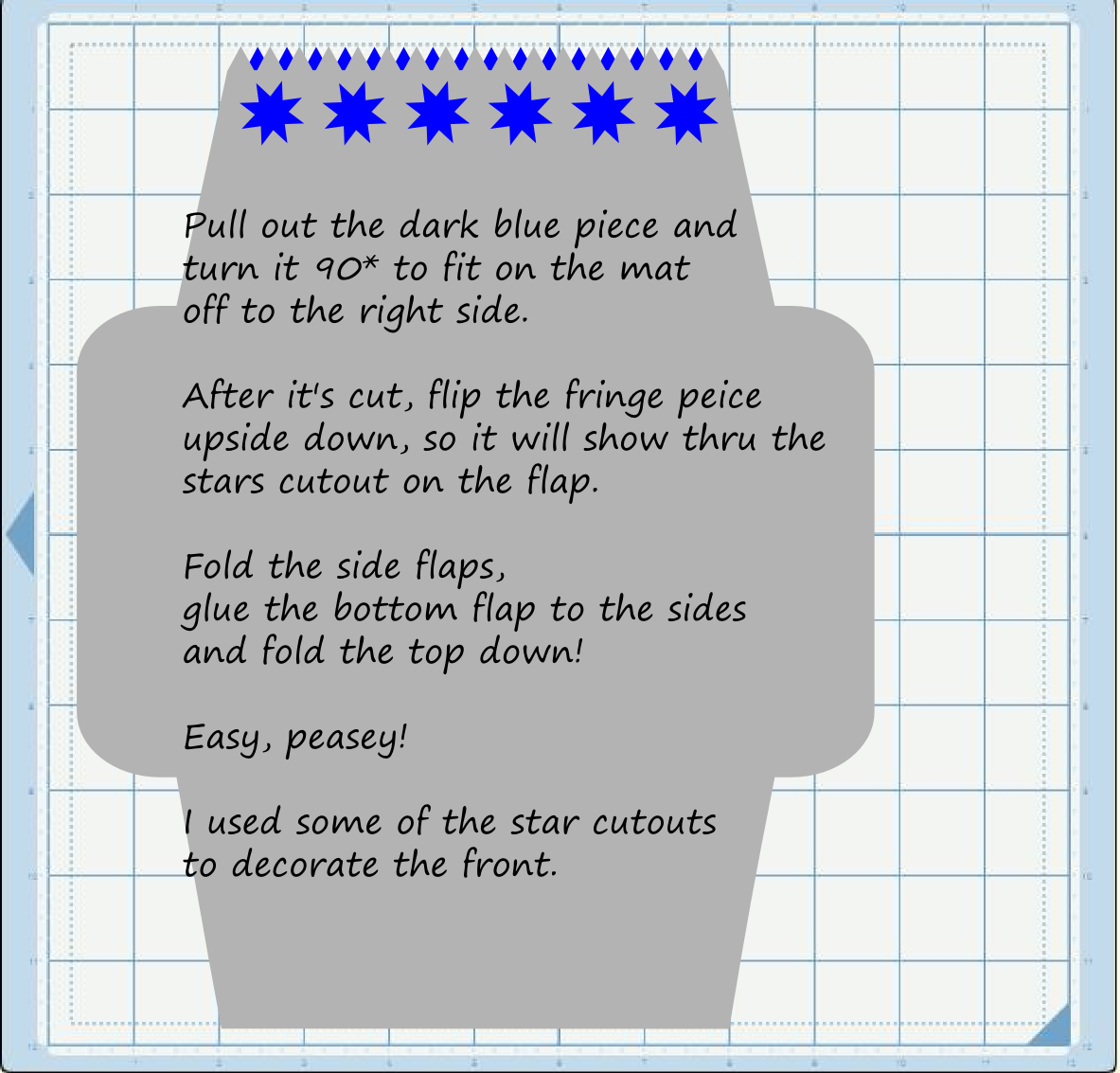
FREE SVG: 5 x 7 Envelope with Stars and "Fringe"

This is the envelope I created for the card posted on my SVG's Page


I posted the SVG and SCUT files on Box.net, if anyone would like to use them!


When the SVG is imported into SCAL, the text across the front is not imported!

Basically, what I did was create the card base (the gray part)

with stars cut out of the top flap.

Then I created a small piece (the blue part) to attach to the flap

so the color shows thru the cutout.

You just have to move the blue piece out and to the right

for it to fit on the mat.

Like this:


I used patterned paper that matched my card.

After it's cut out, fold the large base with the white side on the outside.

Flip the little piece so that the color shows thru the starts

and glue it to the top flap.

Pretty simple!

FREE SVG: Dog Bone and Bow

I created this little file for the inside of my "Diggin Dog" Birthday card.


The bow is cut at 1" and looks pretty good, so I'm sure cut larger, it will be great!

It is set up to have little, thin lines cut that I then used a marker to highlight.

The bone and the bow are two separate pieces,

so the bow can be be used for other projects!

With all the Christmas in July Challenges I've seen recently,

this should come in handy!

Enjoy!


Here is the Inkscape SVG


03 July 2010

Guitar Hero Logo SVG and SCUT


I'm a mom of BOYS!

Obviously, Flowers and Birdies and Hearts are not in our repertoire!

We like TRUCKS and ROCKS and TOUGH, GRUNGY stuff.

Those images are few and far between on the usual Craft websites.

Thank Goodness for Inkscape and Google!

We're working on a new project and wanted to see what the Cricut can do with the Guitar Hero Logo.

Of course, it is a copyrighted logo, so I have not altered it in any way.

I have just CONVERTED it from an image to a cut file, for our personal use.

I am going to share this in my box.net account,

but please remember that it is copyrighted and is for personal use ONLY!

SCAL file for Sure Cuts a Lot


SVG file

01 July 2010

Fishing Dock SVG and SCUT

I made this one today for a project one of my boys is working on.


I don't like to put together a bunch of little pieces, after cutting a file. So I generally tend to make my files in as few pieces as possible. I use the "Path- Difference" function of Inkscape a lot to make "base" layers that I "subtract" all the little pieces out of. Usually, it just seems easier when paper piecing files after they're cut.

In the case of this file, I COULD have made it with a bunch of little boards that had to be put back together. What a time-consuming pain in the neck! What I did instead was make a base (light brown) then a top layer (dark brown) that is all the "spaces" between the boards. When it's layered together, the base shows thru the top layer and there are only TWO pieces to cut! (yay!)

The only drawback with THIS particular file is that the "lines" between the boards are pretty fine lines so it was pretty delicate taking it off my Cricut mat and attaching it to the base layer... I suppose I could go back in and tweak the file to make those lines a little thicker, but after putting it together, I thought it looked awesome the way it was! I cut it at 4". I don't suppose it would turn out very good cut much smaller than that...

Also, when I cut it, I used regular printer paper, which is very thin! Then I just cut another base out of regular cardstock to reinforce it. I used brown ink on the base and a marker for the top layer, to get the right shades of brown on the white printer paper.

With all the summer and beach images I've seen lately, I haven't seen a boat dock or pier, so I did it myself and am pretty happy with the results.

If you have any questions or problems with any of the files I share, please let me know!
This file has been moved to my SVG's Page (you can click there from the menu bar at the top)
SCUT file for Sure Cuts a Lot


SVG created in Inkscape

Links moved to my SVG's Page 


14 June 2010

Here He Comes To Save the Day

[caption id="attachment_12" align="aligncenter" width="268" caption="Here He Comes to Save the Day"]Here He Comes to Save the Day[/caption]

Remember this guy?


All the good cartoons seem to have vanished into TV Wonderland...


He's DH's FAVORITE character, so, just for fun, I found this great image from Google, imported it into Inkscape and created an SVG for Sure Cuts A Lot.


He turned out GREAT!


You can find the SVG here


and the SCUT file here